Skip to content

UI/UX & full-stack developer

I turn complex business processes into clear interfaces and working features.

I design and build business applications end to end: from mapping the process and user flows, through React and TypeScript interfaces, to Python and Node.js backends and integrations.

Three applications, each from process to release

Product names and all data are anonymised. Interfaces are in Polish; the notes explain each screen.

Business project

LeadFlow

A module for qualifying trade-fair leads and running the B2B sales process – from the first call to a signed exhibitor form.

My role
Prototypes and UI specification, frontend, backend, integrations, testing
Users
Consultants, sales reps, team managers
Stack
TypeScript, React, Next.js, Node.js, PostgreSQL, Prisma, Tailwind CSS, shadcn/ui, REST API, SIP.js

Context

Leads come from visitor registrations, forms and research. Consultants qualify them by phone and pass the promising ones to sales reps, who handle the offer, negotiation and the signed exhibitor form.

Challenge

A multi-stage process shared by three roles. Each role needed its own view of the same data, a clean handover without losing context, and visibility of where leads drop out.

Consultant

  1. To contact
  2. In contact
  3. Invitation sent
  4. Confirmed visitor
  5. Hot lead: handover

Sales rep

  1. Interested in offer
  2. Offer sent
  3. Negotiation
  4. Form signed

The manager sees both lanes at once: funnel, refusal reasons, agent comparison and stale leads.
LeadFlow – Consultant, queueLeadFlow – Consultant, contact cardLeadFlow – Manager, dashboardLeadFlow – Sales rep, boardLeadFlow – Interaction states, empty view

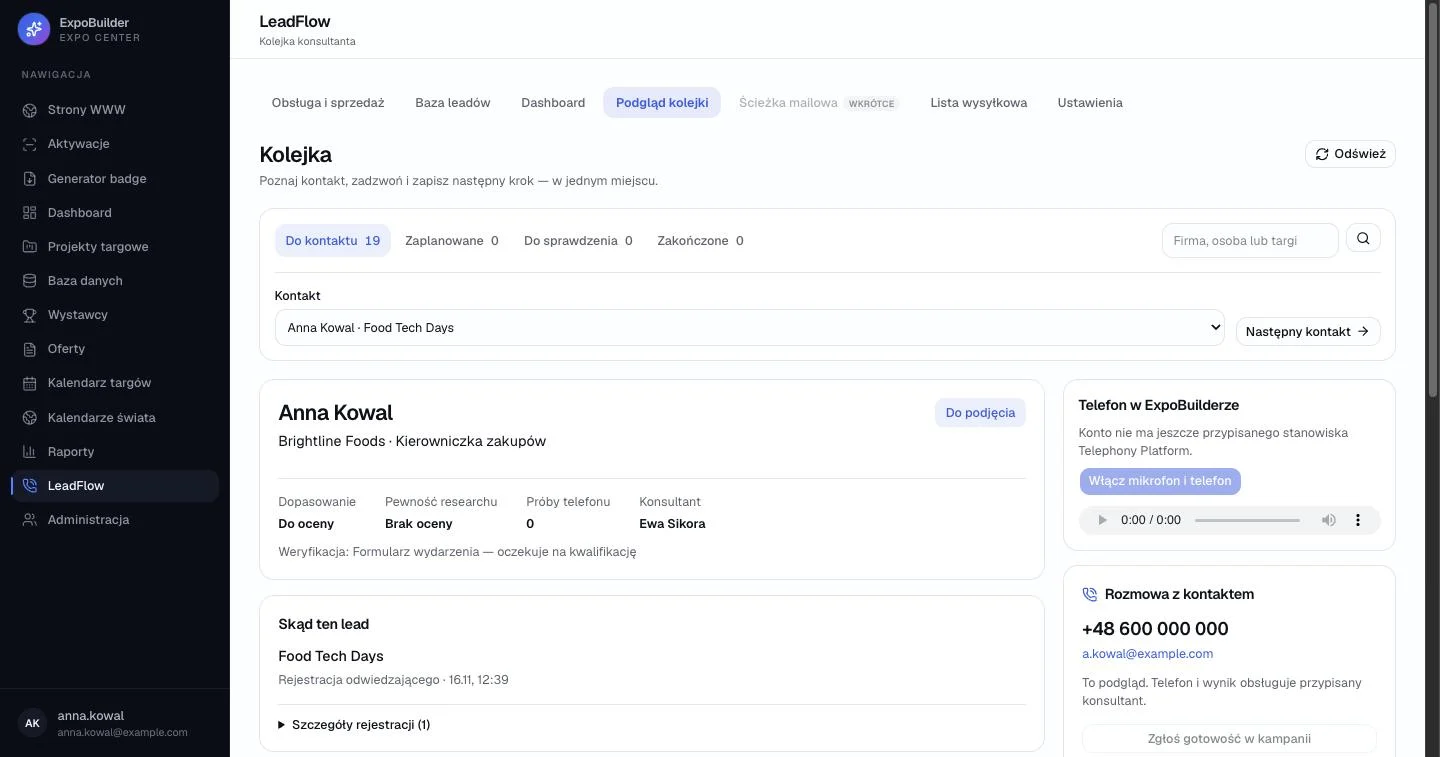
Consultant, queueScreen 1/5

Get to know the contact, call and log the next step – in one view

Queue split by work state. To contact, scheduled, to review and done, each with a live count, so the consultant always knows what is next.

One-click “Next contact”. Keeps the calling rhythm without going back to a list.

Qualification facts above the fold. Fit, research confidence, call attempts and owner – the four things needed before dialling.

Calling sits next to the context. In-browser telephony; only the assigned consultant can call and log a result, others get a read-only preview.

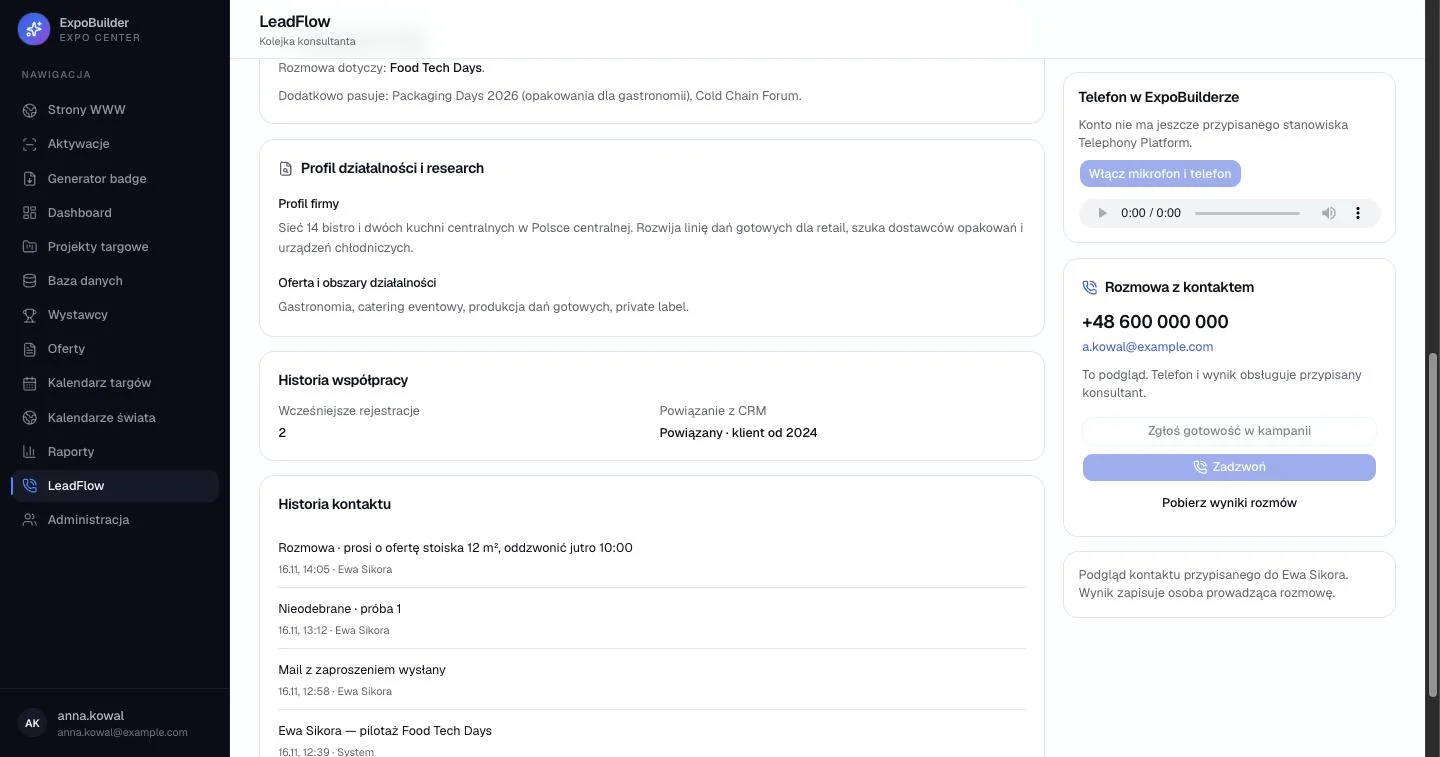
Consultant, contact cardScreen 2/5

Everything needed for a warm call, in reading order

Research first. Company profile and areas of activity explain why this contact matters before the call starts.

Relationship history. Previous registrations and the CRM link prevent cold pitches to existing clients.

Chronological contact log. Every call attempt, e-mail and note with author and time – handover without losing context.

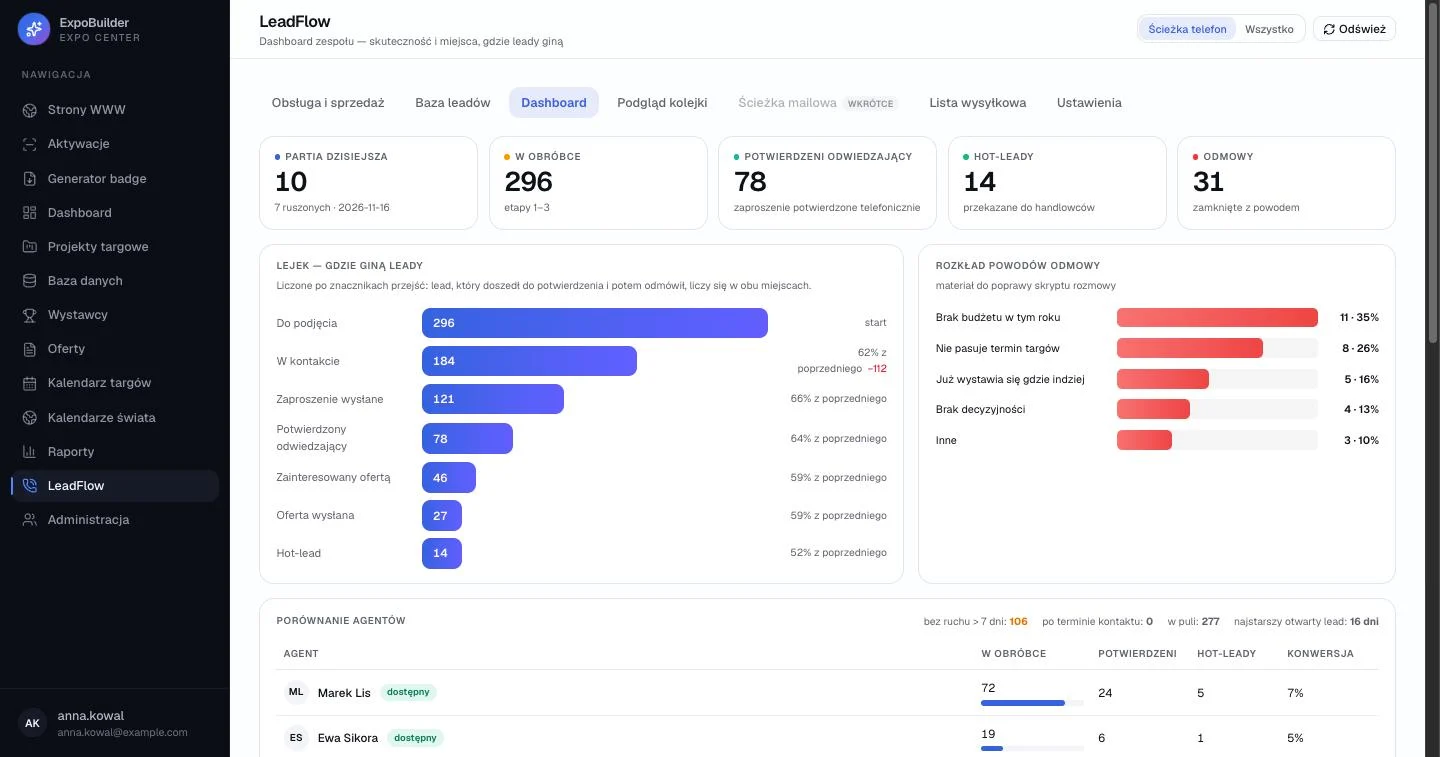
Manager, dashboardScreen 3/5

Where leads get lost – and why

Today at a glance. Today’s batch, leads in progress, confirmed visitors, hot leads and refusals.

Funnel counted by stage transitions. A lead that was confirmed and later refused counts in both places, so drop-off between stages is honest.

Refusal reasons as input. Grouped reasons become material for improving the call script.

Agent comparison and stale leads. Workload, confirmations and conversion per agent, plus leads with no movement for over 7 days.

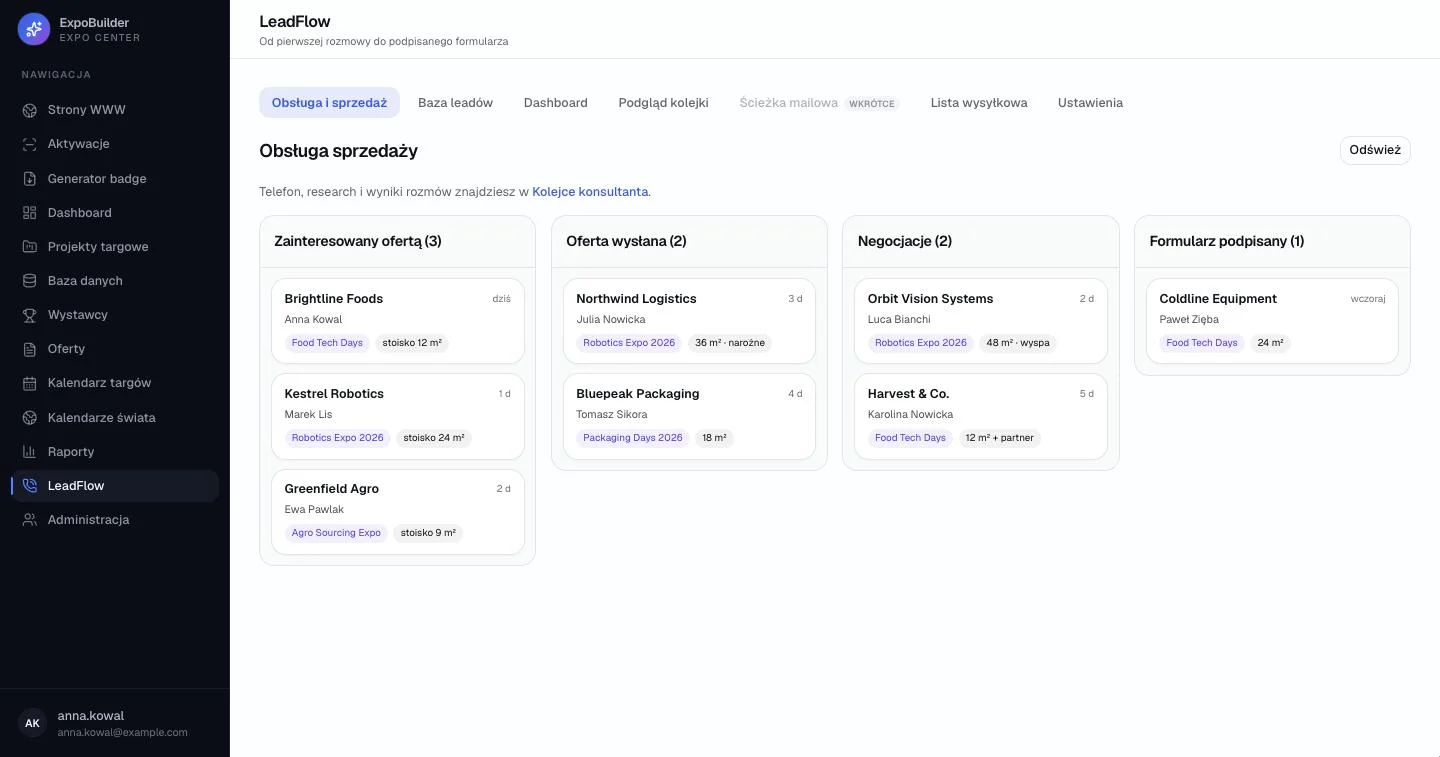
Sales rep, boardScreen 4/5

A sales board that starts where qualification ends

Stages from the real process. Interested in offer, offer sent, negotiation, form signed – with counts per column.

Cards carry the deal context. Company, contact person, event and requested booth size, visible without opening the card.

Time in stage. How long a lead has waited, so nothing goes cold unnoticed.

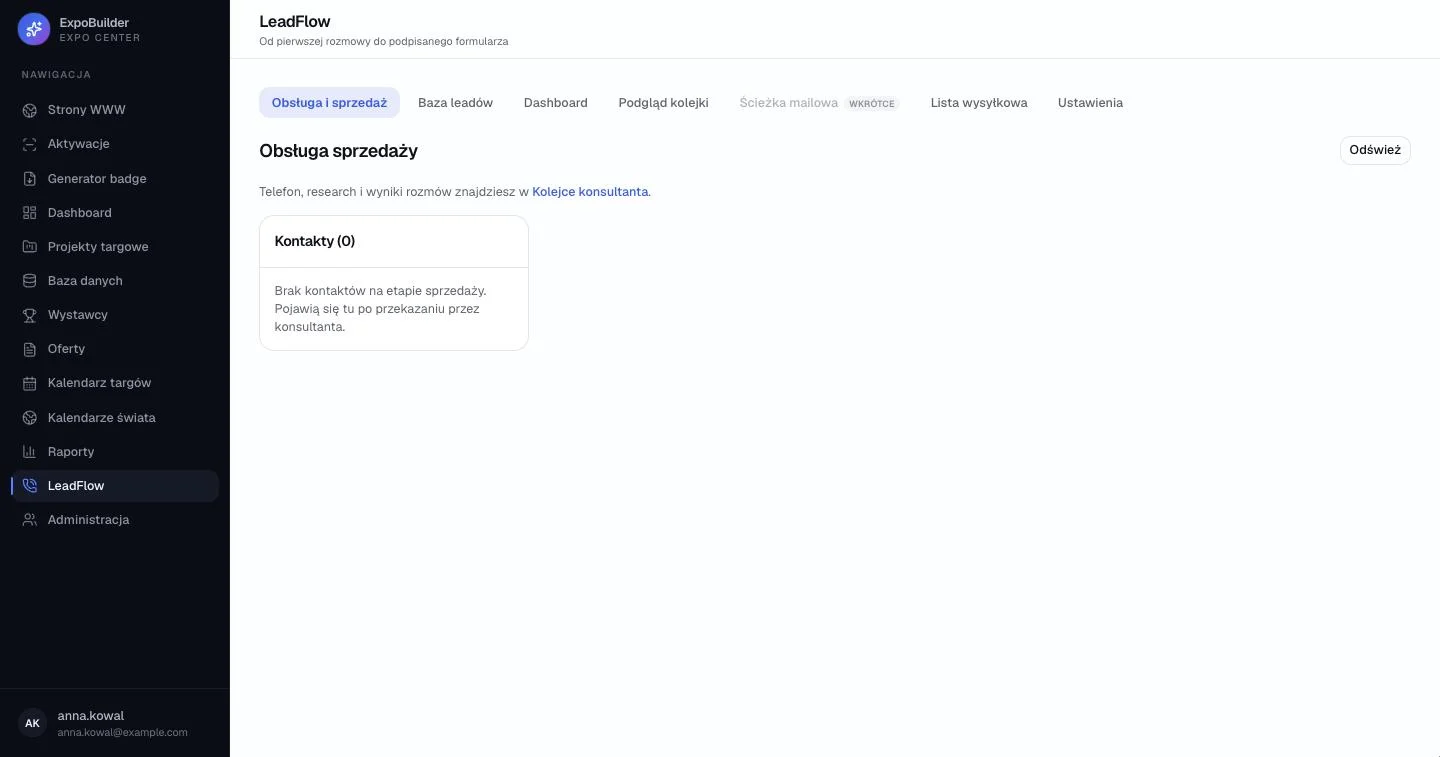
Interaction states, empty viewScreen 5/5

Empty states that explain the process

Not just “no data”. The empty board tells the sales rep that contacts appear here once a consultant hands them over.

What it enables

  • One workflow from the first call to a signed form, with a clean handover from consultant to sales rep.
  • Views and permissions tailored to consultants, sales reps and managers.
  • Managers see where leads drop out and why – input for improving the call script.
  • Duplicate and concurrent-edit protection keeps shared data reliable.
Business project

ExpoBuilder

A business platform for preparing and growing trade fairs – market research, exhibitor acquisition, lead handling and project management in one environment.

My role
Process mapping, admin panels and data views, shared components, database and API
Users
Sales, project, marketing and web teams
Stack
TypeScript, React, Next.js, Node.js, PostgreSQL, Prisma, Tailwind CSS, shadcn/ui, n8n, Anthropic API, Docker
ExpoBuilder – Exhibitors, rankingExpoBuilder – Exhibitors, profileExpoBuilder – Trade-fair projectsExpoBuilder – Websites, board

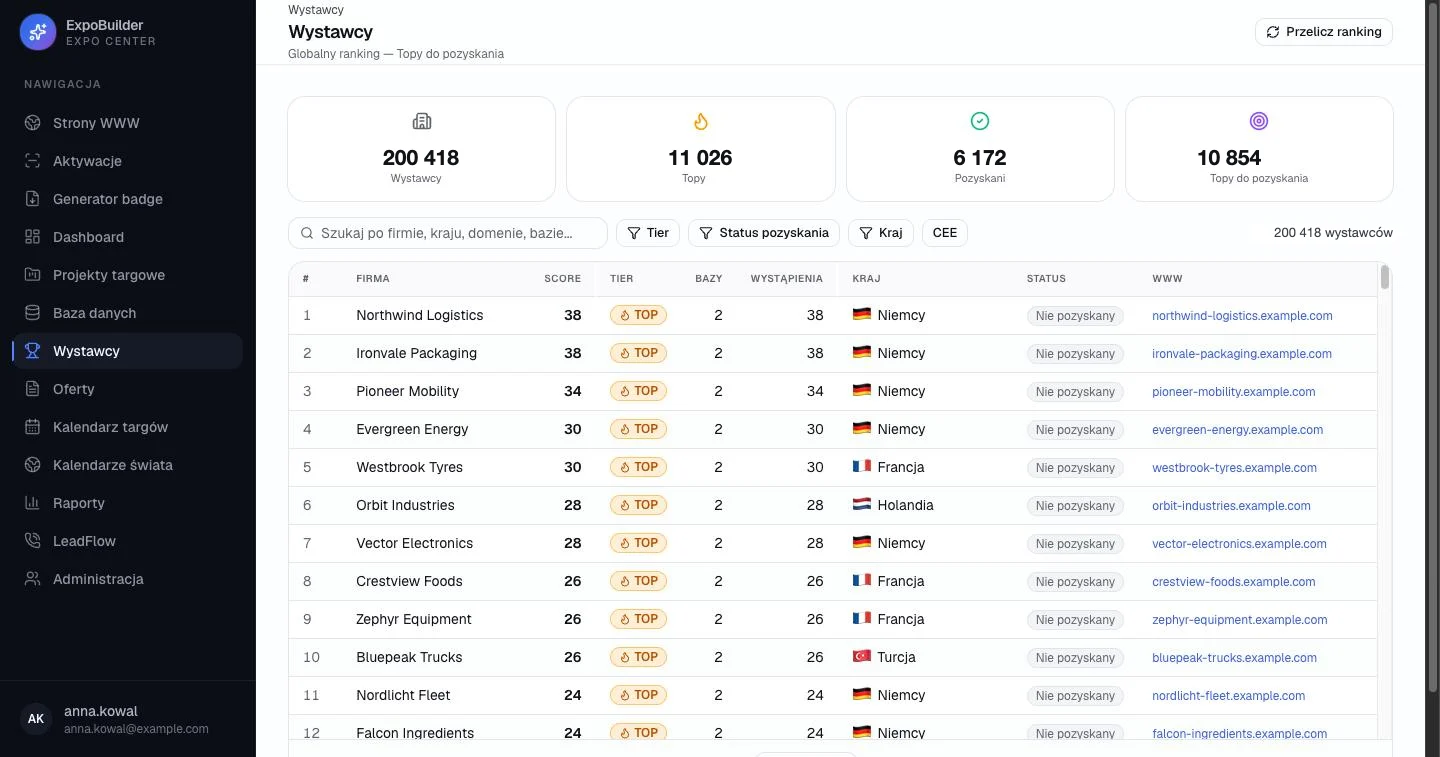
Exhibitors, rankingScreen 1/4

A database of ~200k exhibitors, ranked by sales potential

Pipeline in four numbers. All exhibitors, top prospects, acquired, and top prospects still to acquire.

Filters that match how sales segments. Search by company, country, domain or database, plus tier, acquisition status, country and region.

Score and tier lead the table. The ranking decides who gets contacted first.

Acquisition status per row. Progress is visible without opening each company.

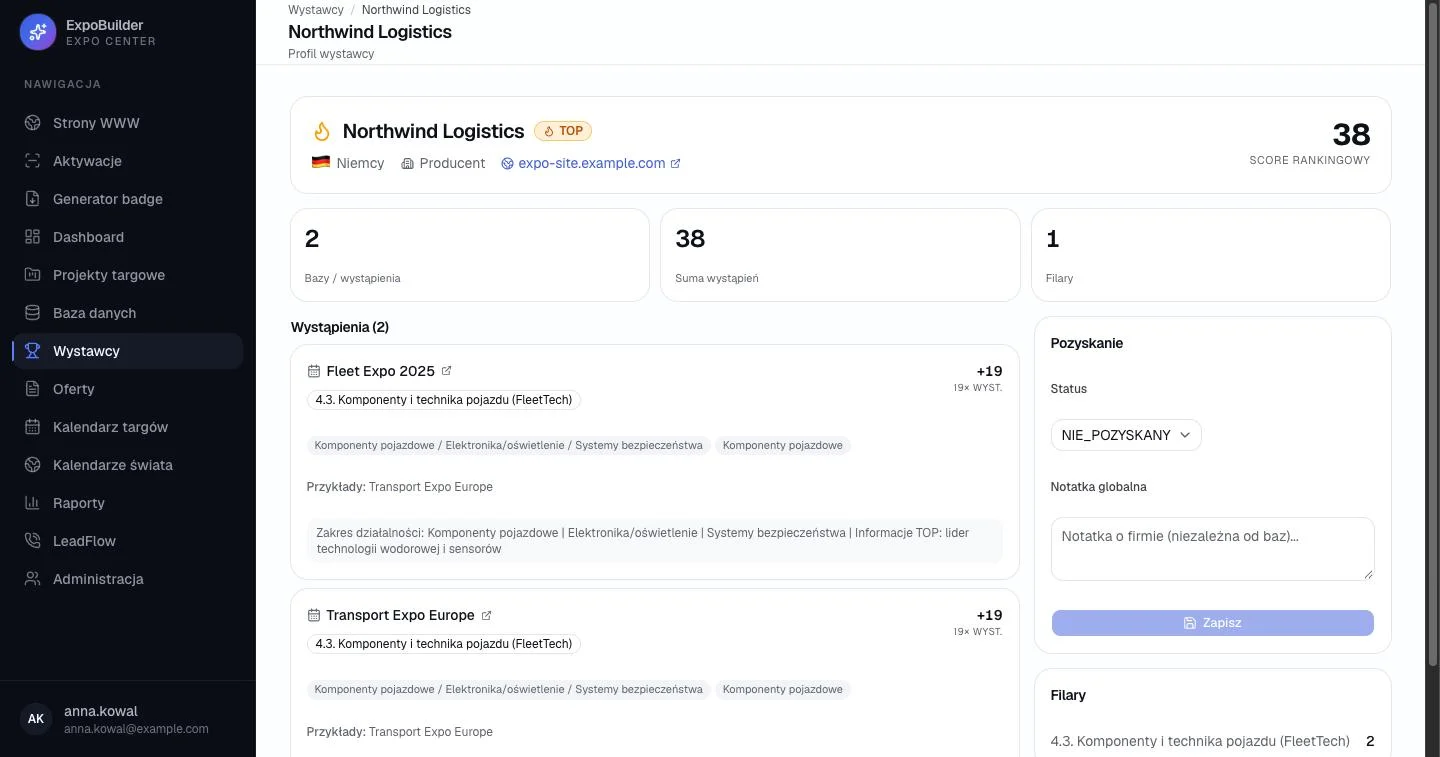
Exhibitors, profileScreen 2/4

A profile that shows why a company scores high

Ranking score up front. The number the team prioritises by.

Evidence behind the score. Appearances at past events with categories and scope of activity.

Acquisition next to the evidence. Status and a global note sit beside the history they are based on.

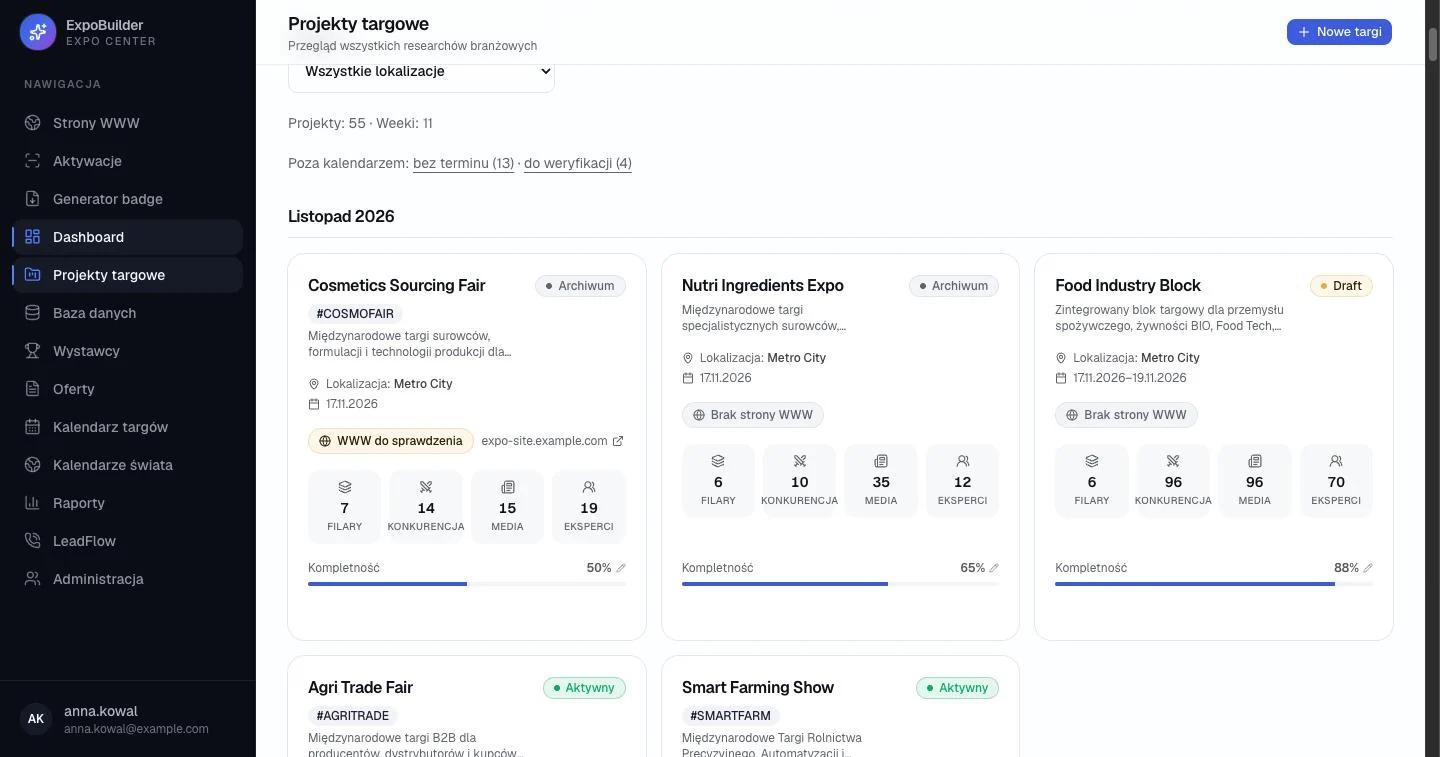
Trade-fair projectsScreen 3/4

Preparation status of every event at a glance

Gaps surfaced, not hidden. Projects without a date or awaiting verification are counted above the calendar.

Research counters. Pillars, competitors, media and experts collected for each event.

Completeness bar. Shows how far preparation has progressed.

Lifecycle status. Draft, active or archived – plus website status for each event.

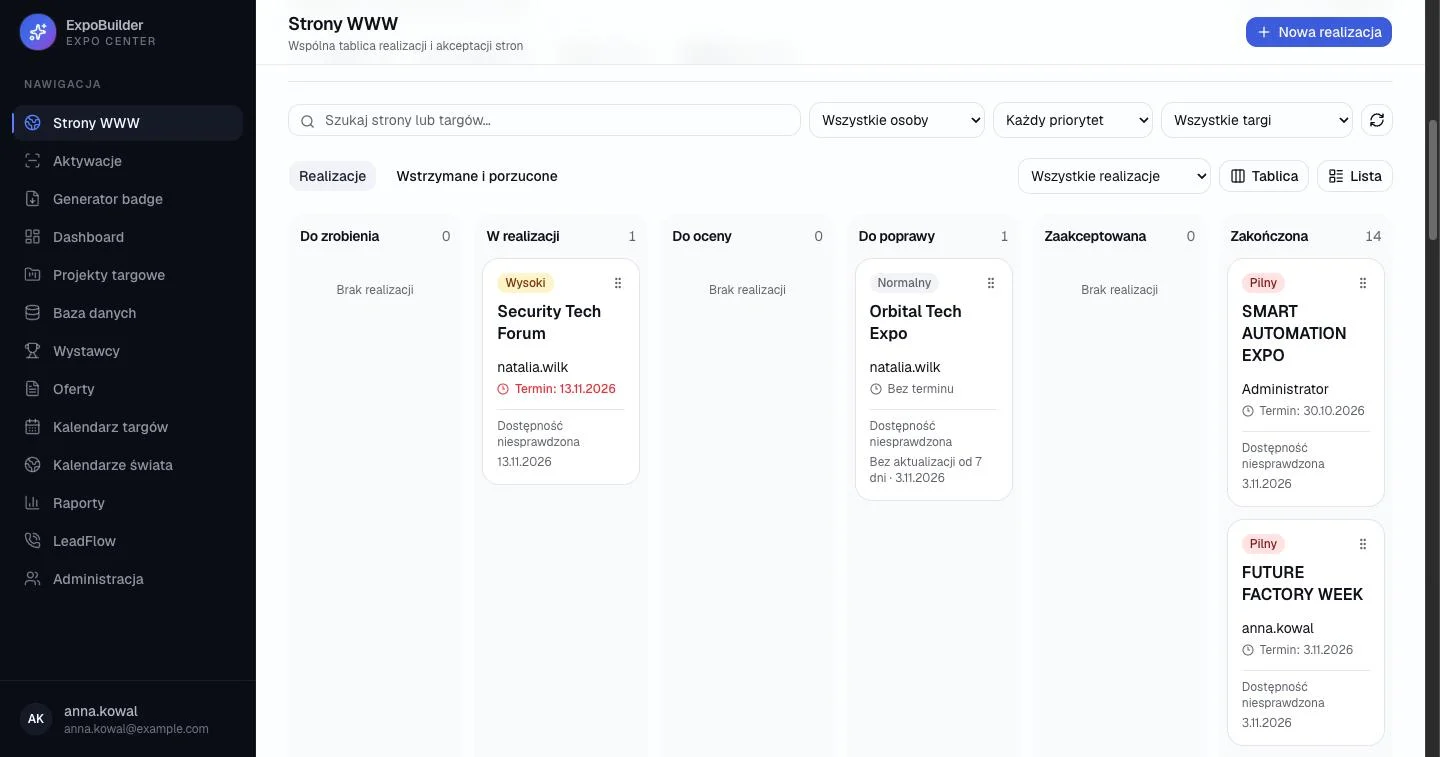
Websites, boardScreen 4/4

Website production with review and acceptance built in

Stages include review. To do, in progress, to review, needs fixes, accepted, done.

Priority, owner and deadline on the card. Overdue deadlines turn red.

Stale work flagged. “No update for 7 days” appears directly on the card.

Board or list. Same data, two views, plus filters by person, priority and event.

What it enables

  • Sales teams pick priority exhibitors based on data, not guesswork, and track acquisition status in one place.
  • Shared project knowledge and a clear picture of how far each event's preparation has progressed.
  • Website work moves through explicit review and acceptance stages, with overdue and stale items made visible.

Independent project

CampaignHub

An application supporting an influencer-marketing agency from brief analysis and the offer, through campaign delivery, to settlements with creators – team work and client service in one environment.

My role
Process design, UI, full-stack implementation, AI integration, user documentation
Users
Agency team, managers, administrators, clients
Stack
TypeScript, React, Next.js, Node.js, PostgreSQL, Prisma, Tailwind CSS, Anthropic API, Docker

Campaign lifecycle

  1. Brief: AI PDF analysis
  2. Offer: CSV/XLSX import, versions
  3. Tender won: automatic handover
  4. Contract, content, client approval
  5. Publication
  6. Settlement and close
CampaignHub – Team, campaignsCampaignHub – Team, campaignCampaignHub – Team, creatorsCampaignHub – Team, settlementsCampaignHub – Team, boardCampaignHub – Client, portalCampaignHub – Client, approvals

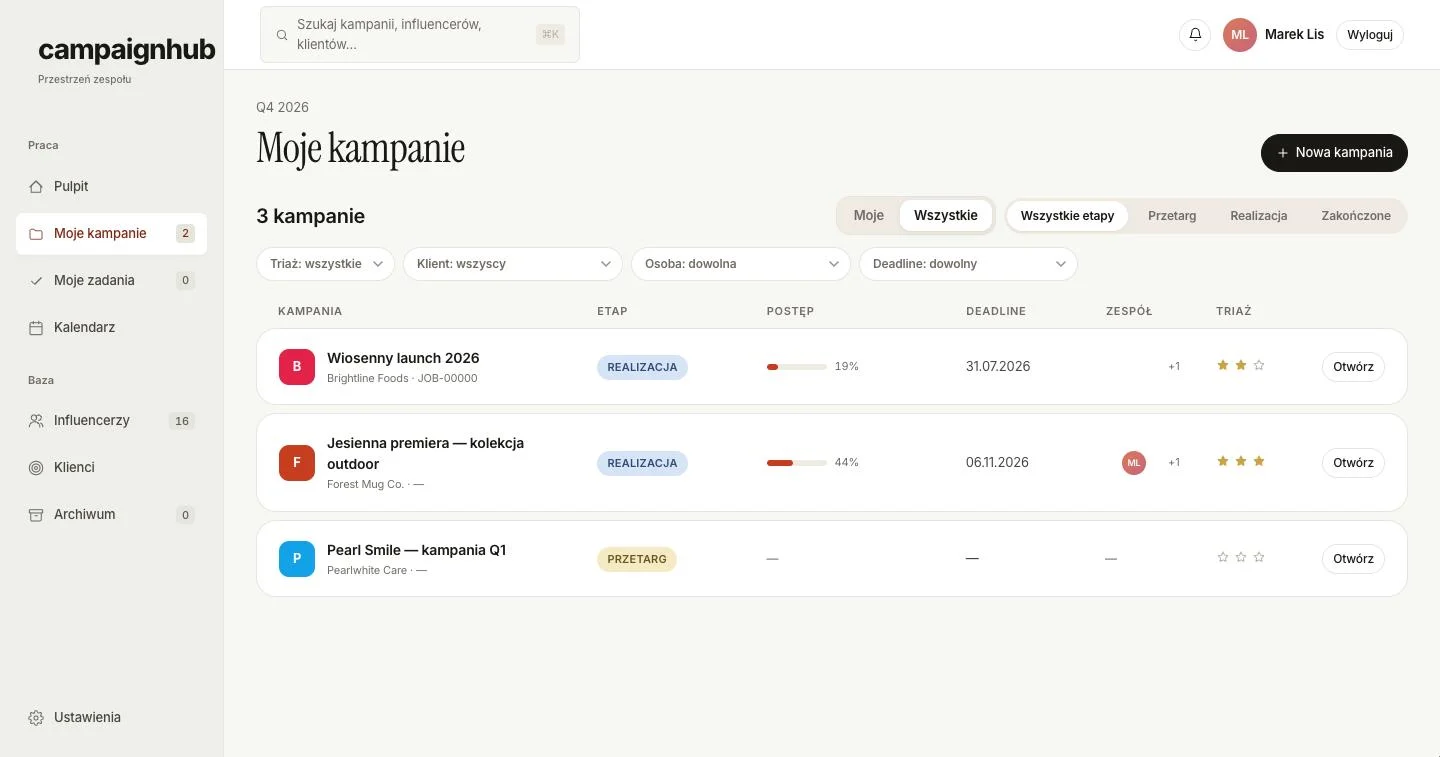
Team, campaignsScreen 1/7

All campaigns, sorted by what needs attention

Mine or all, by stage. Tender, delivery or completed – plus filters by triage, client, person and deadline.

Progress and deadline per row. How far each campaign is, next to when it is due.

Triage priority. A simple three-level priority set by the team.

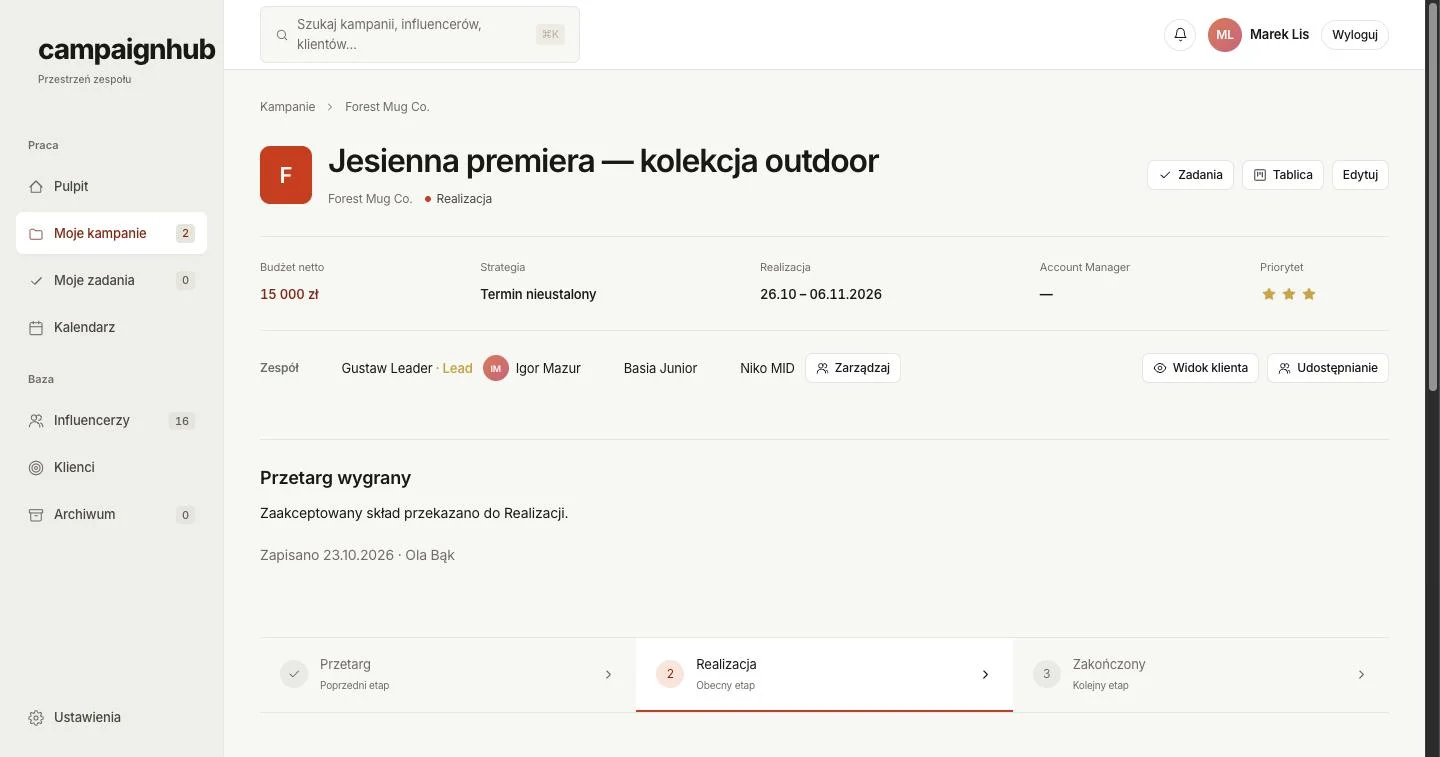
Team, campaignScreen 2/7

A campaign page built around its lifecycle

Stage stepper. Tender, delivery, completed – the current stage is always visible.

Automated handover. Once the tender is won, the accepted line-up moves to delivery automatically.

Client view and sharing. The team can check exactly what the client will see.

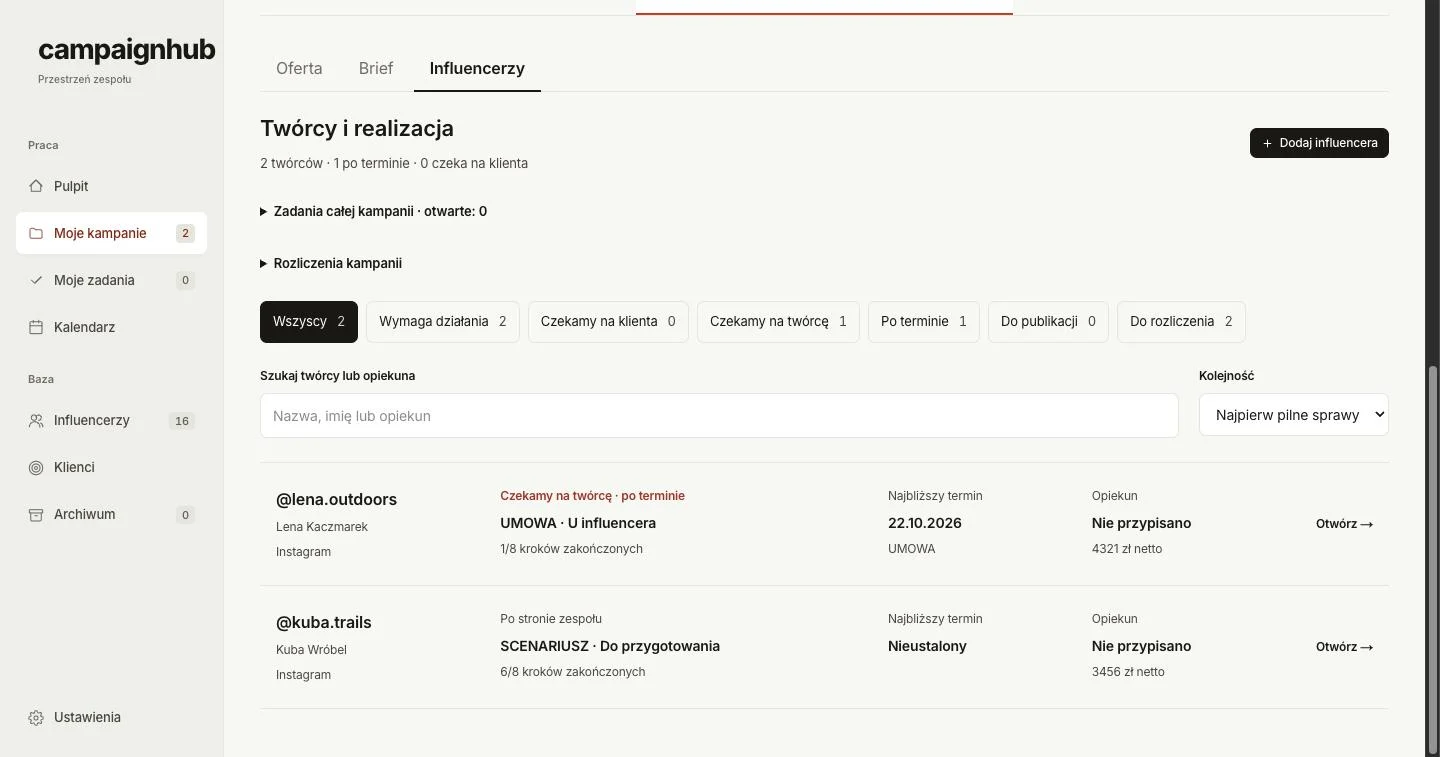
Team, creatorsScreen 3/7

Who is waiting on whom

Status filters with counts. Needs action, waiting for client, waiting for creator, overdue, to publish, to settle.

Urgent first. Default sort puts overdue items on top.

Step progress per creator. Current step, its owner and how many steps are done.

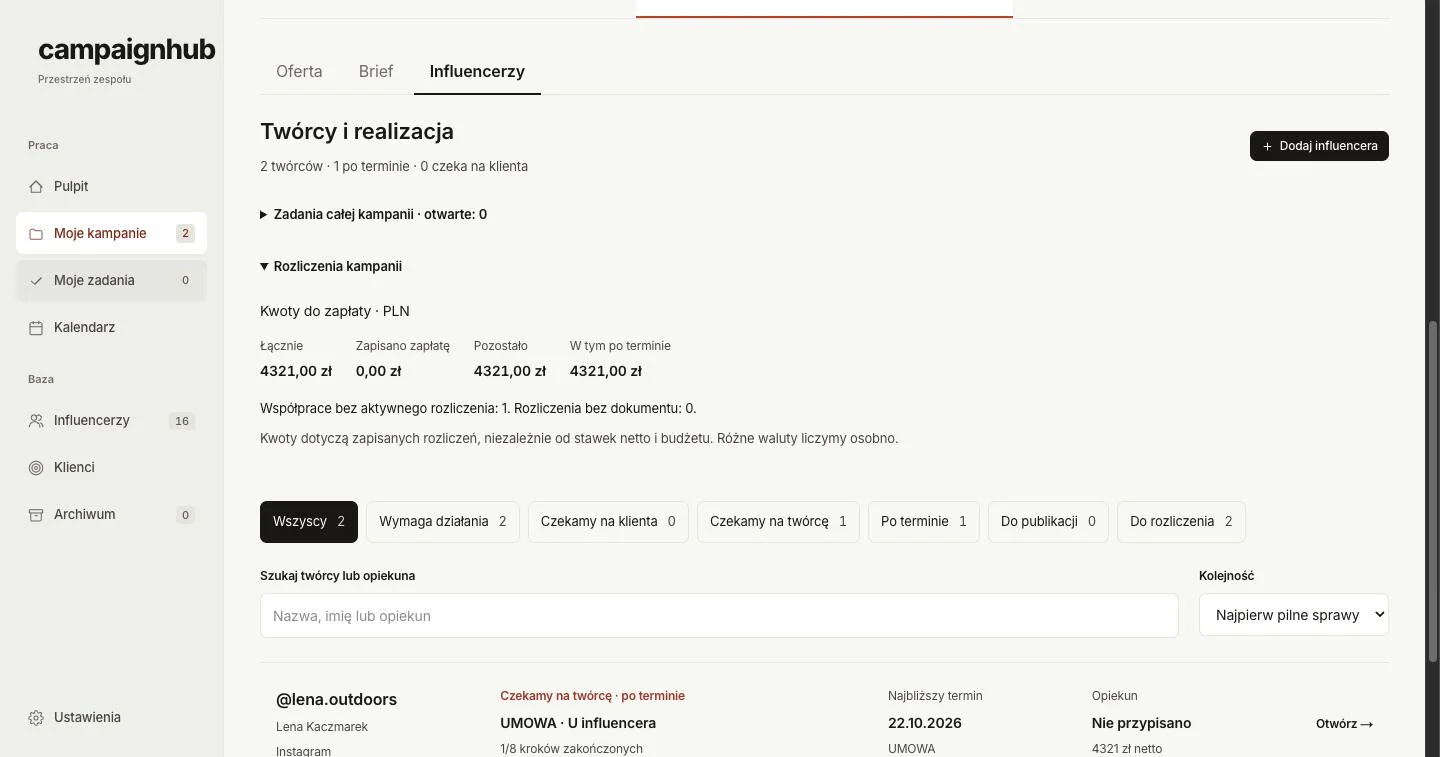
Team, settlementsScreen 4/7

Payments to creators without a spreadsheet

Totals that answer one question. Total, paid, remaining and overdue.

Missing pieces called out. Collaborations without a settlement or document, and a note that currencies are counted separately.

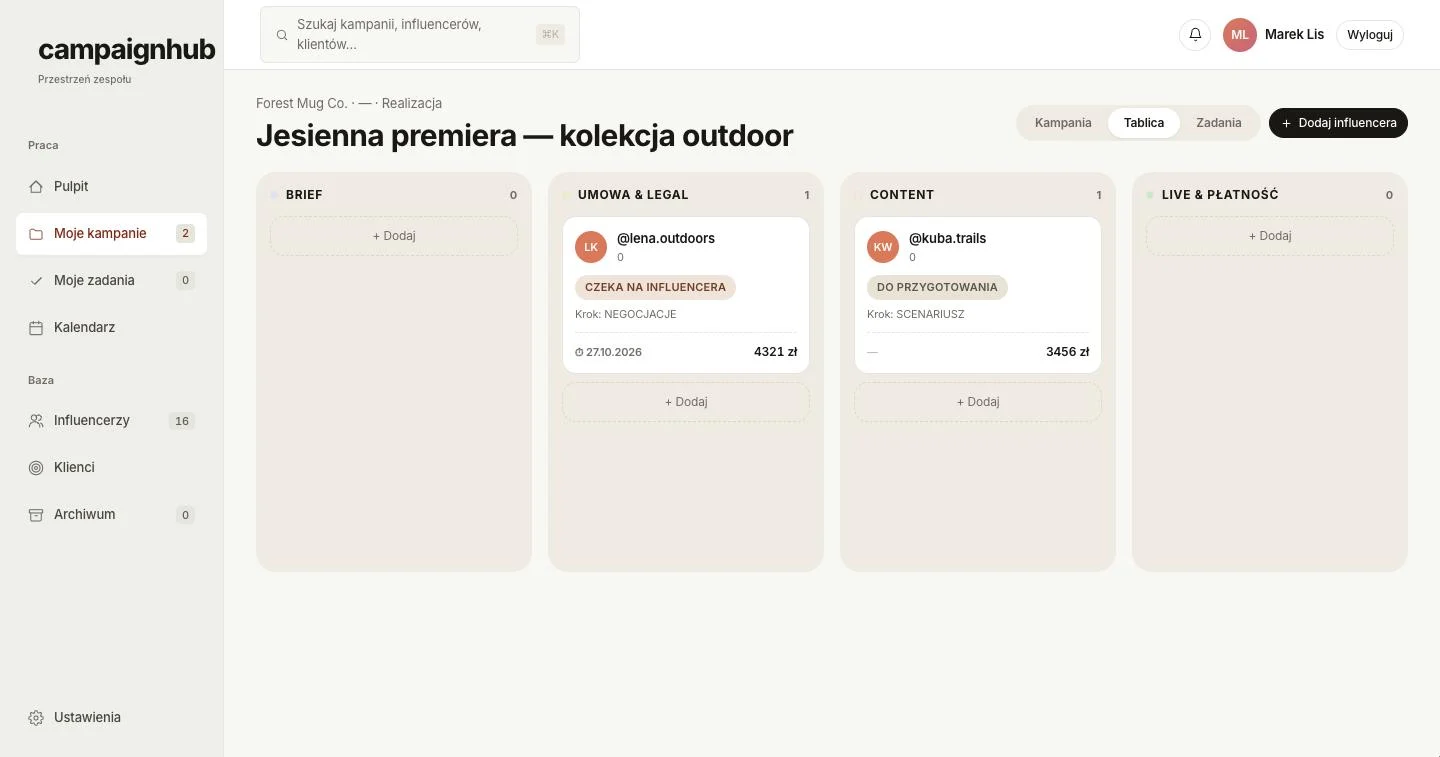
Team, boardScreen 5/7

Collaboration stages on a Kanban board

Columns follow the agency process. Brief, contract & legal, content, live & payment.

Who the card waits on. Status, current step, deadline and amount on each card.

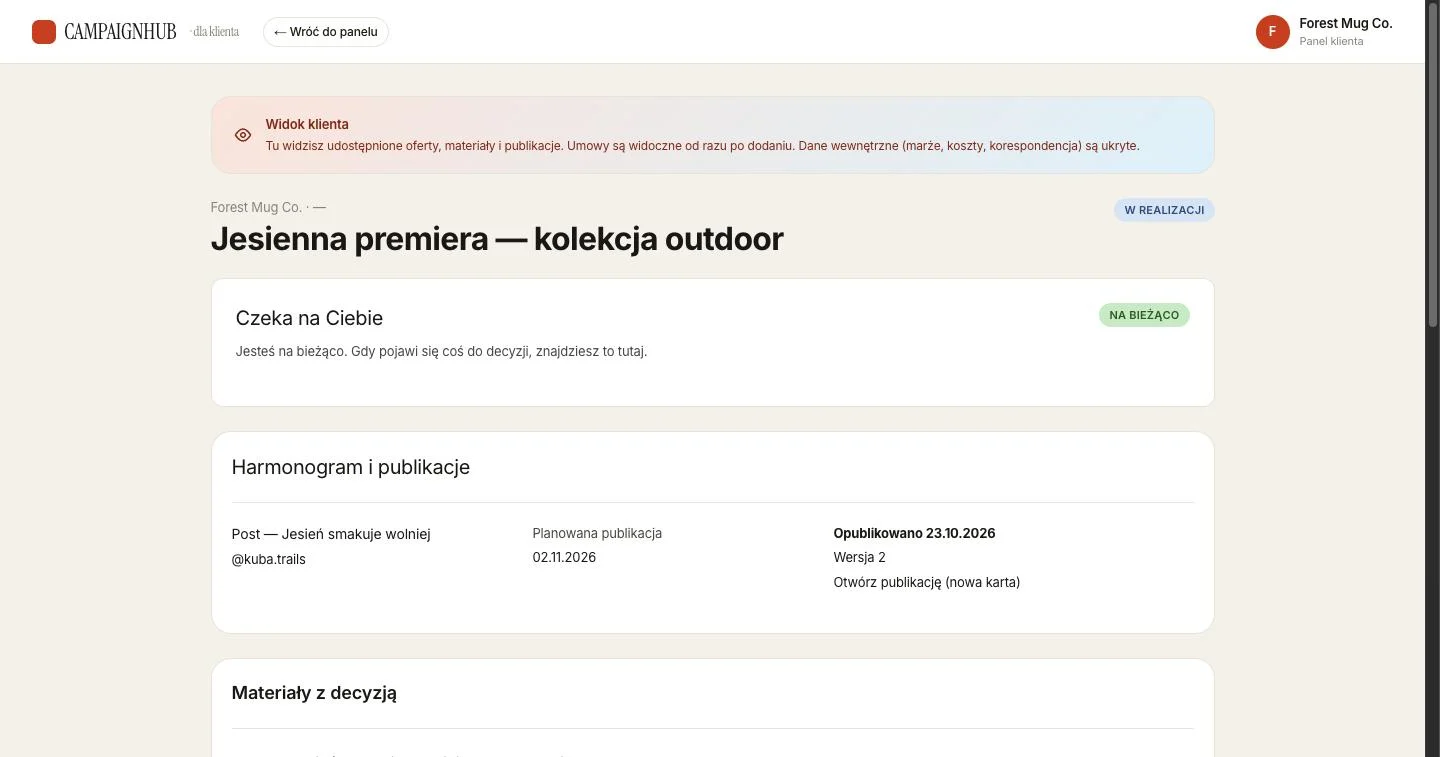
Client, portalScreen 6/7

A client portal that shows only what the client needs

Explicit about visibility. The banner says what is shared and that internal data – margins, costs, correspondence – stays hidden.

“Waiting for you.” The client’s pending decisions come first; an all-clear state when there are none.

Schedule and publications. Planned and published dates with the published version.

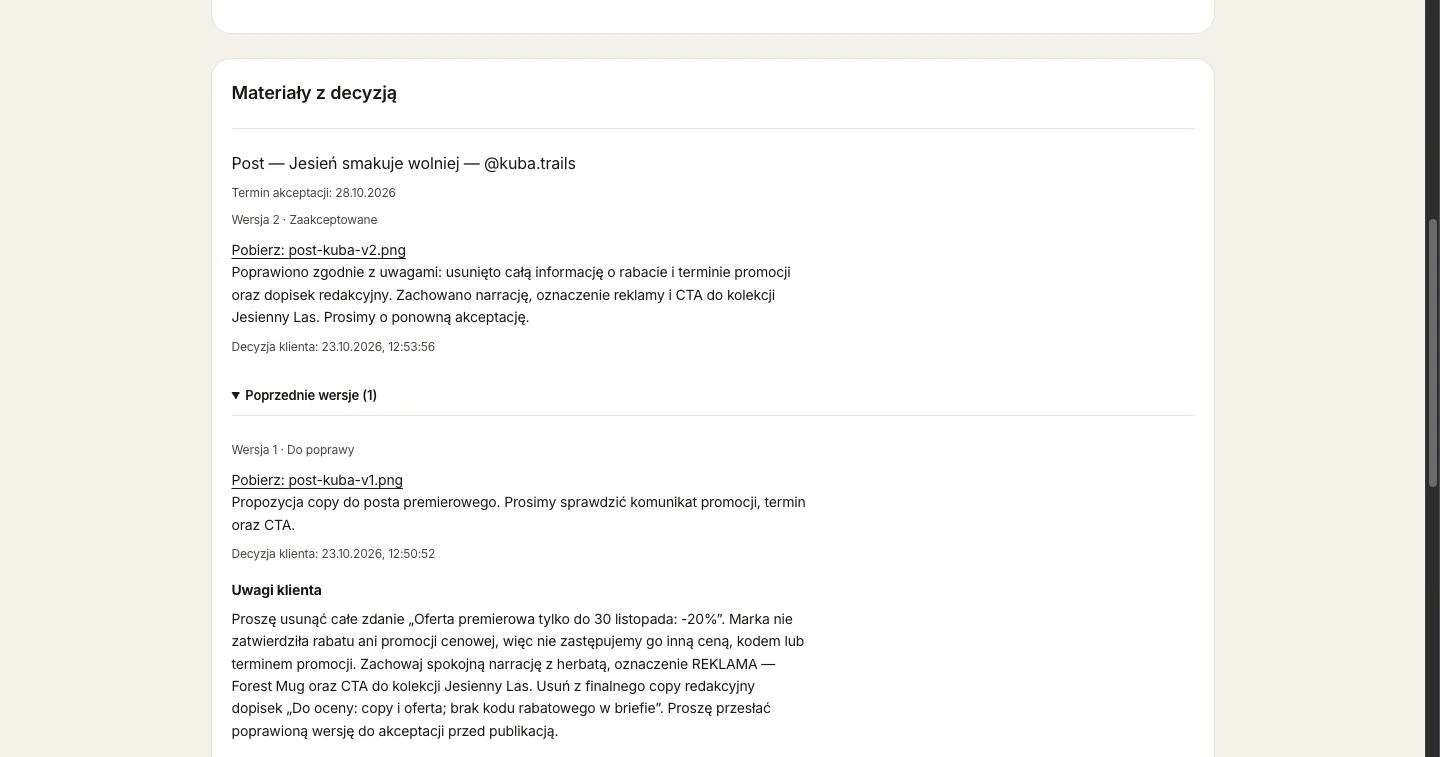
Client, approvalsScreen 7/7

Versioned materials with a clear decision trail

Current version and its status. Version number, approval deadline and decision.

Timestamped client decisions. Every approval or change request is recorded.

Previous versions with feedback. The client’s comments stay attached to the version they refer to.

What it enables

  • One place for team, managers and the client – with each seeing only what they should.
  • Less manual work: accepted collaborations move to delivery automatically, stages update from progress, and deadlines trigger notifications.
  • Clear control over deadlines, costs and client approvals, with a full version and correction history.

Other projects

Oskar Tkaczyk

A developer with an IT project manager's background

I build web applications for business: lead-generation, ad-analytics and campaign-management tools. I start by understanding how people really work and finish with tested, documented code.

I spent several years running IT projects, so I speak the same language with sales teams, management and engineers. One person from analysis to release means fewer handovers and fewer misunderstandings.

What I can help with

  • Business applications and admin panels

    Role-based views, forms, Kanban boards, task queues.

  • Dashboards and reporting

    Funnels, comparisons, refusal reasons – numbers you can act on.

  • Integrations and automation

    APIs, Google Ads, CSV/XLSX import, n8n and AI features on OpenAI and Anthropic models.

  • Prototypes and UI specifications

    Figma wireframes, user flows, information hierarchy and interaction states.

Experience

  1. 02.2026 – now

    Ptak Warsaw Expo

    Senior IT Project Manager

  2. 04.2025 – 01.2026

    OEX Cursor S.A.

    Developer

    Internal web applications in Python and React for sales support and field teams, REST APIs and data integrations.

  3. 11.2019 – 03.2025

    Ptak Warsaw Expo

    From IT Specialist to Senior IT Project Manager

  4. 09.2018 – 10.2019

    Idea Bank

    Service Desk

Skills

UI and product design
Figma, user flows, UI specifications, dashboards, admin panels, data-heavy views
Frontend
TypeScript, React, Next.js, Tailwind CSS, shadcn/ui, HTML, CSS
Backend and data
Python, Flask, Node.js, REST API, PostgreSQL, SQLite, Prisma
Integrations and AI
Google Ads API, OpenAI API, Anthropic API, n8n, Web Push
Testing and tools
Playwright, unit and integration tests, Git, Docker, Jira, Scrum

Certifications and education

  • Professional Scrum Product Owner I
  • PMP®
  • PRINCE2®
  • Vistula University – Computer Network Cybersecurity, 2020–2024